

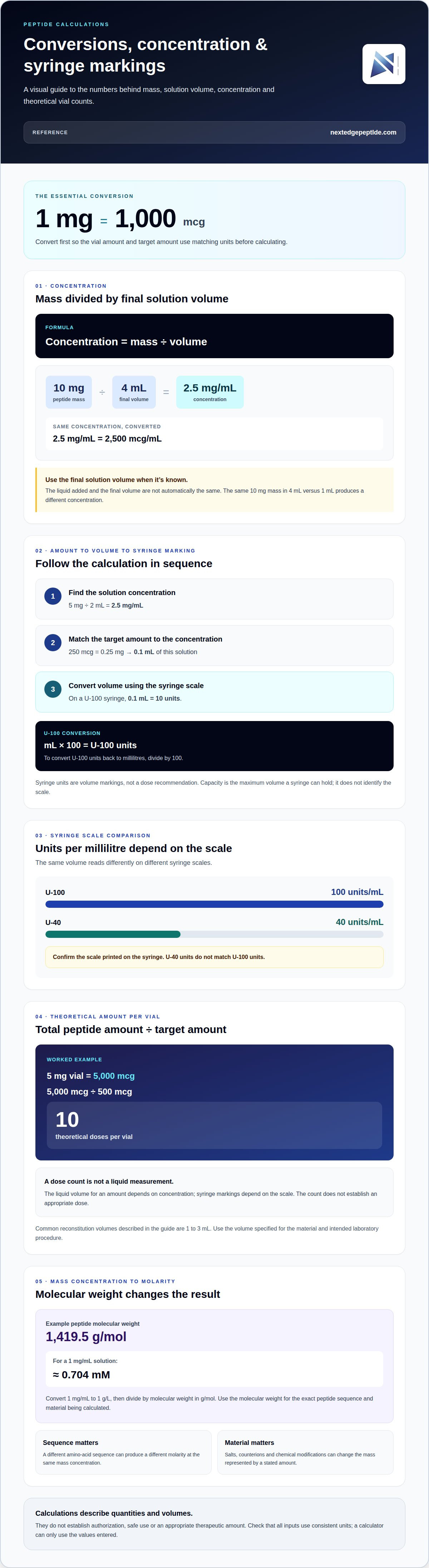
The conversion is exact: 1 mg equals 1,000 mcg. A peptide calculator uses that relationship with vial strength and liquid volume to calculate concentration, the amount of peptide in a measured volume, and corresponding syringe units. The arithmetic is straightforward, but each input must use consistent units.
It’s easy to confuse the liquid added with the final solution volume, or to treat syringe units as a dose rather than a volume marking. This guide walks through the conversions and calculations step by step, including how to find doses per vial and interpret U-100 syringe markings. You’ll also see how concentration changes when the final volume changes, and how to distinguish mass-based concentration from molar concentration. These calculations describe quantities and volumes; they don’t establish an appropriate dose.
Key Takeaways
- Convert between mcg and mg before calculating so the vial amount and target quantity use consistent units.
- Separate the solvent added from the final solution volume; that distinction determines the concentration you calculate.
- Translate a calculated liquid volume to syringe markings using the correct syringe scale, not capacity alone.
- Estimate doses per vial from the total peptide amount and the amount assigned to each dose, and use molecular weight when converting mass concentration to molarity.
Peptide concentration
Calculate concentration from peptide mass and solution volume, then convert units before comparing amounts. Keep concentration, molarity, and dose calculations separate because each requires different inputs.
-
Gather peptide mass and volume
Record the peptide mass and the solution’s final volume, using milligrams and millilitres consistently. A 10 mg vial made up to a final volume of 4 mL contains a different concentration than the same mass in 1 mL. Don’t automatically treat liquid added as final volume. The powder contributes to the solution, so use the final volume when it’s known.
In Canada, rules and health guidance depend on whether a product is intended for research or therapeutic use. A concentration calculation does not establish authorization, safe use, or an appropriate therapeutic amount.
-
Calculate peptide concentration
Divide peptide mass by final solution volume: concentration = mass ÷ volume. For 10 mg in 4 mL, the result is 2.5 mg/mL. Convert milligrams to micrograms by multiplying by 1,000; therefore, 2.5 mg/mL equals 2,500 mcg/mL.
For a volume-based amount, multiply concentration by the volume measured. At 5,000 mcg/mL, 0.05 mL contains 250 mcg. On a U-100 syringe, 0.1 mL equals 10 units. A dose calculation based on body weight requires a prescribed amount per unit of body mass, multiplied by the person’s mass. That formula does not determine what amount is appropriate.
-
Convert concentration to molarity
Use molecular weight to convert mass concentration to molar concentration. Convert 1 mg/mL to 1 g/L, then divide by molecular weight in g/mol. For a peptide with molecular weight 1,419.5 g/mol, a 1 mg/mL solution is approximately 0.704 mM.
Enter the molecular weight for the exact peptide sequence. Because amino acids determine molecular mass, a different sequence can produce a different molarity at the same mass concentration. Keep units consistent throughout.
-
Account for peptide modifications
Use the molecular weight that matches the material being calculated. Salts, counterions, and chemical modifications can change the mass represented by a stated amount, affecting the molarity result. A peptide calculator uses only the values entered, so an incorrect molecular weight produces a misleading output.
Check whether the listed mass refers to the peptide alone or to a modified form. Do not infer storage conditions from a concentration result. Storage guidance depends on the material and solution, not the arithmetic alone.
Peptide dose-to-syringe-unit calculations
Free online peptide calculators can convert units, but accuracy depends on correct inputs and a transparent formula. Compare the displayed result with the calculation below. A syringe marking represents volume, not a dose recommendation.
- Set the target volume. Divide the target amount by the solution concentration to find the volume required. For a 5 mg vial mixed with 2 mL, the concentration is 2.5 mg/mL. A 250 mcg amount is 0.25 mg, which corresponds to 0.1 mL of this solution. Keep the target amount and concentration in matching units before dividing.
- Convert volume to U-100 units. A U-100 scale has 100 units per millilitre, so multiply millilitres by 100. In the example above, 0.1 mL reads as 10 units. Conversely, divide units by 100 to convert a measured U-100 marking to millilitres. Confirm the syringe scale before interpreting its lines.
- Match capacity to the measured volume. Syringe capacity indicates the maximum volume it can hold; check the markings before interpreting them. Capacity describes the maximum volume, not the scale type. Select a syringe whose markings can represent the calculated volume; don’t assume every syringe uses U-100 graduations.
- Check the scale and intended use. U-40 has 40 units per millilitre, so its units don’t match U-100 units. The same volume reads differently on each scale. Recalculate against the scale printed on the syringe, and treat any calculated volume as a measurement only. It doesn’t determine whether or how to inject. Freezing a solution doesn’t change syringe conversions.
Use a free calculator that shows a transparent formula, enter the target amount and solution concentration in matching units, and compare its result with the calculation shown here. The section does not identify specific calculators.
Calculating doses per vial
- Read the vial strength. Use the peptide mass shown on the vial, such as 5 mg or 10 mg. Convert milligrams to micrograms before calculating: 1 mg equals 1,000 mcg, so a 5 mg vial contains 5,000 mcg. Treat this as the labelled amount, not as a number of doses. The target amount per dose determines the theoretical count.
- Record the liquid volume used for reconstitution. Lyophilized material is dried, so the calculator needs the amount of liquid added to determine the resulting concentration. Common reconstitution volumes include 1 to 3 mL. Use the volume specified for the material and intended laboratory procedure; don’t select a volume just to create a preferred dose count. Mixing instructions and solvent compatibility depend on the specific material.
- Divide total peptide amount by the target amount. For a 5 mg vial and a 500 mcg target, convert the vial amount to 5,000 mcg, then calculate 5,000 ÷ 500. The theoretical result is 10 doses. A calculator can perform this division, but it cannot establish an appropriate dose or confirm that each measured amount is suitable for use.
- Separate dose count from liquid measurement. The calculated count is the vial’s labelled peptide amount divided by the selected target. It does not show how much liquid corresponds to each amount. That volume depends on concentration, while syringe markings depend on the scale. Do not treat an insulin syringe marking as a peptide dose or use this arithmetic as instructions to inject research material.
How do I calculate peptide concentration and molarity from mass and volume?
- Choose the correct mass and volume. Record each compound’s mass and the solution’s final volume. Keep milligrams and millilitres together for mass concentration. For a blend containing 5 mg each of compounds A and B in 2 mL, calculate each compound separately. Don’t treat the blend’s combined mass as the amount of either individual compound.
- Calculate mass concentration for each compound. Divide each compound’s mass by the final volume. In the example, compound A is 5 mg ÷ 2 mL, or 2.5 mg/mL. Compound B is also 2.5 mg/mL. Adding those concentrations gives a combined mass concentration of 5 mg/mL, but that total doesn’t describe either compound individually.
- Check the amount in a measured volume. Multiply each concentration by the sample volume. A 0.1 mL sample from the example contains 0.25 mg, or 250 mcg, of compound A. It contains the same amount of compound B. This distinction matters for blends: report the amount of each component, not only the combined peptide mass.
- Convert mass concentration to molarity. Use each compound’s molecular weight separately. Convert mg/mL to g/L, then divide by molecular weight in g/mol to obtain mol/L. Since 1 mg/mL equals 1 g/L, a concentration of 2.5 mg/mL becomes 2.5 g/L before division. Multiply mol/L by 1,000 to express the result in mM.
- Keep component identities attached to results. Molarity depends on molecular weight, so compounds A and B can have different molar concentrations despite matching at 2.5 mg/mL. Record each name, mass concentration, molecular weight, and molarity together. For a blend, avoid assigning one molarity to the combined 5 mg/mL unless its components share the same molecular weight.
NextEdge Peptldes: Peptide Calculator
NextEdge Peptldes offers a peptide calculator to organize concentration, volume, and syringe-unit calculations. Enter research vial inputs consistently and compare the output with the formulas in this guide. Keep units aligned, distinguish liquid added from final volume, and use the correct syringe scale. Results support research calculations; they do not establish a therapeutic dose or replace medical guidance.
NextEdge Peptldes also offers GLP-3 (Reta), GLP-2 (Tirz), and BPC-157 + TB-500 Blend. Keep each compound’s identity and vial information distinct when calculating blend components, since molecular weight affects molarity.
Contact NextEdge Peptldes to discuss the calculator or its research compounds.
Make Your Next Calculation Traceable
Keep a repeatable record for each research calculation. A peptide calculator can organize inputs, but records should also identify the material and purpose of the calculation. Keep these details together to trace how a result was produced and reproduce the process later.
Use a peptide calculator with defined inputs, then record the output and calculation method. Label each result clearly as concentration, molarity, amount per volume, or syringe-volume conversion. This makes later review more useful than a number without context.
For a next step, contact NextEdge Peptldes about the calculator. Discuss how a peptide calculator could fit your research workflow and what calculation you need to organize. A clear starting point helps you move forward with a documented method.
Frequently Asked Questions
How do I convert between mcg and mg?
Divide micrograms by 1,000 to get milligrams, or multiply milligrams by 1,000 to get micrograms. For example, 75 mcg equals 0.075 mg. A peptide calculator can handle the conversion, but retain the original unit beside each value in your notes. This makes it easier to spot a unit-entry error before using the converted amount in another calculation.
How do I determine the peptide amount in my vial?
Use the peptide mass printed on the vial label as the stated amount, not the vial’s physical capacity or liquid volume. For example, a label stating 5 mg identifies 5 mg of peptide before considering content or purity distinctions. For a blend, identify the labelled amount of each component separately. The combined amount doesn’t describe either peptide individually.
Is this calculator medical advice?
No. The calculator performs mathematical conversions for educational and laboratory purposes, not as medical advice. It cannot determine whether a substance is appropriate for a person, assess health risks, or establish a therapeutic amount. In Toronto and elsewhere in Canada, treat the result as arithmetic only. It does not replace assessment or instructions from a qualified clinician.
What if my dose is not a whole number of units?
A result between syringe markings represents a volume the selected scale may not show precisely. Do not round up or down just to reach a whole-unit marking, since rounding changes the measured amount. Check whether the syringe graduations can represent the calculated volume. For therapeutic use, follow the prescriber’s measurement instructions rather than adapting a research calculation.
Why does adding more water change the units I draw?
Adding more liquid lowers concentration when the peptide amount stays constant. A lower concentration requires a larger volume to contain the same peptide amount, so the syringe-unit reading increases. The peptide mass has not increased; it is distributed through more liquid. Recalculate using the actual final volume rather than comparing syringe markings alone.
What calculations can this tool perform?
A peptide calculator processes peptide quantities, liquid volumes, and measurement scales entered by the user. Depending on its functions, it can convert mass units, calculate mass concentration, estimate portions per vial, or convert volume into syringe units. Some tools also calculate molarity from molecular weight. Results depend on accurate inputs and do not establish a medically appropriate dose or replace clinical guidance.


